



Apple recently announced new AI features in their built-in Mail app. Last night, the Public Beta released the early stages of these features to early adopters.
The new feature has two elements: inbox previews and in-email previews. This innovative addition aims to enhance the email experience for Apple users by leveraging artificial intelligence to streamline various aspects of email management.
How Apple Mail AI Works
Inbox preview summaries and in-email summaries are similar but not identical, due to in-email summaries having a higher character count limit.
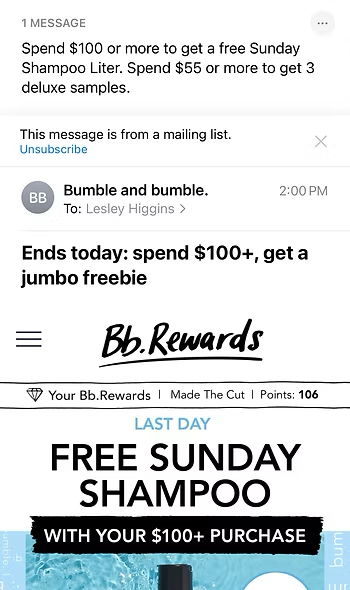
By the way, I’m much more likely to open a Bumble and Bumble email that summarizes the discount in the preview without making me sift through graphics first.
It’s worth noting that Apple Mail users must actively click “Summarize” within an email to see the in-email summary. Since this requires an extra step, it’ll be interesting to see how users adopt this feature and whether it evolves over time.

What This Means for Email Marketers
People will be more or less likely to open your emails depending on what Apple’s AI pulls in. This is neither entirely good nor bad. It will be important to think about your emails from the perspective of how Apple’s AI treats it in the Mail App as part of your overall email strategy.
For example, here’s the inbox view of an email from E-Trade. Previously, I had to open this email to see my eye-popping dividend. Now, Apple summarizes it for me. I know there’s nothing else worthwhile in this email, so I can simply swipe left and archive it unread.

Is it still a relevant notice? Absolutely. Is it bad that I am no longer opening this email? Since open metrics are mostly useless at this point anyway, then I don’t think it really matters. For all I know, Apple is telling E-trade that I opened this email.
Key Takeaway #1: Separate Transactional and Marketing Content
Separate transactional and marketing content (as you should already be doing). If marketing content is mixed into transactional emails, it’ll likely go unnoticed. Instead, keep transactional emails simple and send distinct marketing emails that entice recipients to open them.
AI Makes Some Emails More Appealing
As mentioned earlier, I’m more likely to open an email when Apple’s AI provides relevant information that interests me.

The original pre-header stated “30% off select performance sunglasses!” While the AI summary isn’t drastically different, it does offer a few more details, making it more enticing.
Key Takeaway #2: Include All Relevant Details in Text
Make sure all relevant details are included in text in your email so the AI can pull them up into the summary.
The Problem with Image-Heavy Emails
On that note, Apple’s AI struggles to summarize emails that consist primarily of images. This limitation adds another reason to avoid creating all-image emails. When the AI can’t find text in the email body, it resorts to extracting information from the footer—often leading to irrelevant or unhelpful summaries.
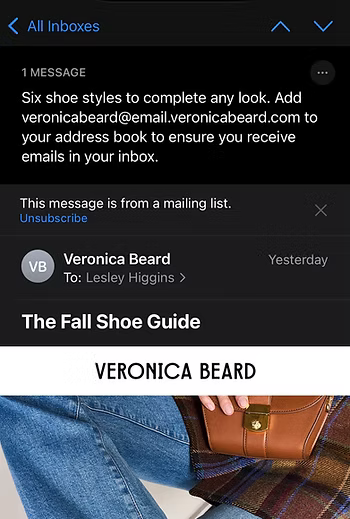
Key Takeaway #3: Stop Sending All-Image Emails!
Stop sending all-image emails! Not only do they hurt deliverability and accessibility, but now they also result in poor AI summaries that could reduce engagement.
Strategic Implications for Email Marketing
Apple’s AI summarization feature represents a fundamental shift in how users consume email content. Here are the key strategic considerations:
- Text-First Approach: Ensure your most important information is available in text format
- Content Architecture: Design emails knowing that AI will extract and summarize key points
- Dual Purpose Content: Create content that works both for human readers and AI parsing
- Engagement Redefinition: Consider how AI summaries might affect traditional open rate metrics
As this feature rolls out more widely, we’ll likely see significant changes in email engagement patterns. The marketers who adapt their strategies early will have the advantage of optimized performance as Apple Mail users increasingly rely on AI summaries to manage their inbox.
Bottom line: Apple’s AI isn’t just changing how emails are read—it’s changing which emails get opened in the first place. Make sure your email strategy accounts for this new reality.