


Let’s start dipping our toes into web3, shall we?
You may find yourself in the near future having to access assets that live on the blockchain from the comfort of your web2 home. What is the difference, really? Salesforce Marketing Cloud has its feet firmly planted in web2. We know this because there is a behemoth company that hosts all of your data in “the cloud” which is really just a database that lives in servers that are owned by Salesforce and/or another behemoth company (AWS).
Web3, on the other hand, distributes all the data across a network of servers that have to agree with each other. Two of those companies that we are going to touch on are The Graph and Moralis.
Understanding Web3 Infrastructure
The Graph
The Graph utilizes Subgraphs, which are hosted by a network of indexers that index data on the blockchain and store it. The Graph is free to use, but the indexers have to stake GRT tokens in order to prevent bad actors from providing bad indexes. The Graph allows developers to query the indexes via API.
Moralis
Moralis allows developers to create servers to host their dApps (decentralized Apps) so that they don’t have to buy their own physical servers. In other words, virtual servers. However, what really excites me about Moralis are the fantastic APIs.
The Problem: OpenSea’s Search Limitations
This project started with a flaw in OpenSea. OpenSea is the largest marketplace for listing and buying NFTs. There is a huge trend in NFT projects at the moment to generate 10,000 NFTs as a fundraising mechanism. Think of it as funding a start-up, but without the VC pitches. An NFT project can generate, as an example, $4 million in income on the day of the mint, and also have an ongoing stream of revenue when NFTs are resold on a secondary market and the royalties built into the smart contract are automatically captured.
OpenSea, and other platforms, allow you to search through these collections for certain traits (hair color, skin color, clothing, facial features, accessories, etc). These traits are defined in the metadata for each NFT.
The flaw in OpenSea, and other platforms, is that you cannot search the description field. This is largely because NFT projects generally populate the description field with a description of the project, and it’s the same for every NFT in the collection. However, there has been a recent trend of creating a unique, and fun, description for each individual NFT.
The Meta Angels Use Case
The first collection I saw leverage unique descriptions was Crypto Coven. The second was Meta Angels.
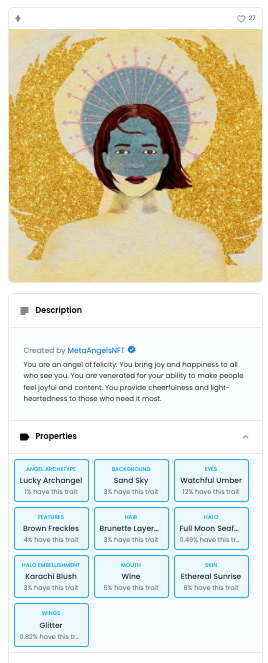
The artwork for Meta Angels is gorgeous, but what really resonates with people is the Angel Type and Description. Examples range from:
- Angel of Sunrises
- Angel of Libraries
- Angel of Mansplaining
There are 568 distinct angel types and no two descriptions are alike. Here are four of my Angels:
Angel of Coaching: “You are an angel of coaching. You help children to become their best selves, both on and off the field. You are honored for your ability to motivate and inspire others. You provide guidance and support to those who are growing and learning.”
Angel of Sunrises: “You are an angel of sunrises. You bring hope and new beginnings to the world, heralding a fresh start for everyone. You are revered for your ability to help people believe in the power of possibility. You provide optimism and hope to those who seek renewal.”
Angel of Prosperity: “You are an angel of prosperity. You bring light and hope to those working toward success, lifting them up in their efforts. You are venerated for your ability to help people work toward financial security. You provide support to those seeking abundance and wealth.”
There were a lot of requests in the community for the ability to search descriptions. I personally really wanted to find an Angel of Early Adopters. Clicking through 10,000 Angels on OpenSea was a futile exercise.
Initial Attempt: The Graph
My first attempt began with The Graph. A solution for Crypto Coven with a GitHub repo was brought to my attention. I even tracked down the developer, Nader Dabit, at ETH Denver and he spent about an hour helping me set up the Graph CLI on my computer.
However, after meticulously updating the mapping for Meta Angels, I discovered that the key element of using The Graph is that the metadata lives in IPFS. For the purposes of this explanation, let’s just call IPFS a distributed database.
Most NFT projects are minting a contract that includes an image URL and that image is stored in IPFS, AWS, or some other file storage platform. NFT projects like Crypto Coven also store their metadata in IPFS. Meta Angels, however, has their metadata stored on their own app. So, I was ultimately not able to create a subgraph using The Graph.
The Solution: Web2 Approach with Marketing Cloud
So, to make my life easier, I turned back to a web2 solution. The good news is that I could see the following solutions coming up again in Marketing Cloud life as we dip our toes into web3.
Step 1: Extract NFT Data to Data Extensions
The first step was to get the 10,000 Angels into a Marketing Cloud Data Extension. Fortunately, the metadata for each Angel is JSON formatted:
{
  "name": "Meta Angels #1",
  "description": "You are an angel of grand visions. You see the world as a place of possibility, and you long to create something new and wonderful. You are venerated for your dedication to fostering connection and opening doors for others. You are a volcano of new ideas.",
  "image": "https://metaangelsnft.mypinata.cloud/ipfs/QmWhG8fiKLTcSTkeEcQTa2LNYNEuZM3LpXvFJVtfUHhHzA/1.jpeg",
  "dna": "b87a512c11e869eea143169ec6d7a63d78f81a63",
  "edition": 1,
  "date": 1644298429174,
  "attributes": [
    {
      "trait_type": "Background",
      "value": "Blue Sky"
    },
    {
      "trait_type": "Wings",
      "value": "Lucky Butterflies"
    },
    {
      "trait_type": "Angel Archetype",
      "value": "Wild Angel"
    },
    {
      "trait_type": "Rarity Rank (#1 Rarest)",
      "value": 967,
      "max_value": 10000
    }
  ],
  "angel_type": "Angel of Grand Visions",
  "score": 569.5972403897124,
  "external_url": "https://app.metaangelsnft.com/token/1"
}
The Data Extraction Script
Each Angel lives at https://app.metaangelsnft.com/metadata/[number].json, so I was able to run a loop that retrieved each Angel and inserted it into a Data Extension. I used AMPScript’s HTTPGet because it’s so easy, followed by SSJS to process the results.
%%[for @i = 0 to 750 do
  set @JSON = HTTPGet(concat("https://app.metaangelsnft.com/metadata/",@i,".json"))
]%%

<script runat="server">
Platform.Load("Core", "1")

// Clear out variables at the start of every loop
var background = '';
var wings = '';
var halo = '';
var embellishment = '';
var skin = '';
var eyes = '';
var mouth = '';
var attire = '';
var hair = '';
var archetype = '';
var rarity = '';

var number = Variable.GetValue("@i");
var str = Variable.GetValue("@JSON");
var obj = Platform.Function.ParseJSON(str);
var name = obj.name;
var description = obj.description;
var image = obj.image;
var angel_type = obj.angel_type;
var external_url = obj.external_url;
var attributes = obj.attributes;

if(attributes.length >= 1) {
  for (i = 0; i < attributes.length; i++) {
    if (attributes[i].trait_type === "Background") {
      var background = attributes[i].value;
    } else if (attributes[i].trait_type === "Wings") {
      var wings = attributes[i].value;
    } else if (attributes[i].trait_type === "Halo") {
      var halo = attributes[i].value;
    } else if (attributes[i].trait_type === "Halo Embellishment") {
      var embellishment = attributes[i].value;
    } else if (attributes[i].trait_type === "Skin") {
      var skin = attributes[i].value;
    } else if (attributes[i].trait_type === "Eyes") {
      var eyes = attributes[i].value;
    } else if (attributes[i].trait_type === "Mouth") {
      var mouth = attributes[i].value;
    } else if (attributes[i].trait_type === "Attire") {
      var attire = attributes[i].value;
    } else if (attributes[i].trait_type === "Hair") {
      var hair = attributes[i].value;
    } else if (attributes[i].trait_type === "Angel Archetype") {
      var archetype = attributes[i].value;
    } else if (attributes[i].trait_type === "Rarity Rank (#1 Rarest)") {
      var rarity = attributes[i].value;
    };
  };
};

var rows = Platform.Function.UpsertData("Meta Angels",
  ["Number"],[number],
  ["name","description","image","angel_type","external_url","Background","Wings","Halo","Halo_Embellishment","Skin","Eyes","Mouth","Attire","Hair","Angel_Archetype","Rarity_Rank"],
  [name,description,image,angel_type,external_url,background,wings,halo,embellishment,skin,eyes,mouth,attire,hair,archetype,rarity]);
</script>

%%[ next ]%%
Key Technical Notes
- I ran loops of about 750 Angels at a time as the script timed out if I went much above that
- With 10,000 total Angels, I had to run the script around 13 or 14 times
- I created a Data Extension called “Meta Angels” with the field “Number” as a primary key so I could re-run the script without duplicating data
- Most things in development start at 0, not 1
Step 2: Building the Search Interface
Now onto the front end. I built a very basic front end because I was only trying to achieve the goal of searching descriptions. The first thing I did was add Bootstrap to a CloudPage in Marketing Cloud:
The Search Form
<div class="container">
  <div class="row">
    <div class="col-md-6 offset-md-3">
      <form action="%%=RequestParameter('PAGEURL')=%%" method="post">
        <div class="mb-3">
          <label for="angelSearch" class="form-label">Angel Search Term</label>
          <input type="text" class="form-control" id="angelSearch" name="angelSearch" aria-describedby="angelSearch">
          <div id="angelSearchHelp" class="form-text">Keep it simple, but not too simple.</div>
        </div>
        <input name="submitted" type="hidden" value="true">
        <button type="submit" class="btn btn-danger">Submit</button>
      </form>
    </div>
  </div>
</div>
The Search Results Logic
Upon form submission, I use SSJS to format a query to the Meta Angels data extension. This is a very powerful SSJS tool and it runs much faster than a query in Query Studio:
<script runat="server">
Platform.Load("core", "1.1.1");

var angelsDE = DataExtension.Init("DE-EXTERNAL-KEY");
var input = Variable.GetValue("@searchTerm");
var filter = {Property:"description",SimpleOperator:"Like",Value:input};
var data = angelsDE.Rows.Retrieve(filter);

Write("Number of Results: " + data.length + "<br><br>");

for (var i = 0; i < data.length; i++) {
  Write("Angel Number: " + data[i].Number + '<br/>');
  Write("Angel Type: " + data[i].angel_type + '<br/>');
  Write("Angel Archetype: " + data[i].Angel_Archetype + '<br/>');
  Write("Rarity Rank: " + data[i].Rarity_Rank + '<br/>');
  Write("Description: " + data[i].description + '<br/><br/>');
  Write('<img src="' + data[i].image + '" width="250" height="auto">');
  Write("<br><br><hr>");
};
</script>
Complete Implementation
Full CloudPage Code
%%[IF RequestParameter("submitted") == true THEN
  SET @searchTerm = RequestParameter("angelSearch")
]%%

<div class="container">
  <div class="row">
    <div class="col-md-6 offset-md-3">
      Search Term: %%=v(@searchTerm)=%%<br><br>

      <script runat="server">
      Platform.Load("core", "1.1.1");

      var angelsDE = DataExtension.Init("DE-EXTERNAL-KEY");
      var input = Variable.GetValue("@searchTerm");
      var filter = {Property:"description",SimpleOperator:"Like",Value:input};
      var data = angelsDE.Rows.Retrieve(filter);
      Write("Number of Results: " + data.length + "<br><br>");

      for (var i = 0; i < data.length; i++) {
        Write("Angel Number: " + data[i].Number + '<br/>');
        Write("Angel Type: " + data[i].angel_type + '<br/>');
        Write("Angel Archetype: " + data[i].Angel_Archetype + '<br/>');
        Write("Rarity Rank: " + data[i].Rarity_Rank + '<br/>');
        Write("Description: " + data[i].description + '<br/><br/>');
        Write('<img src="' + data[i].image + '" width="250" height="auto">');
        Write("<br><br><hr>");
      };
      </script>
    </div>
  </div>
</div>

%%[ELSE]%%

<div class="container">
  <div class="row">
    <div class="col-md-6 offset-md-3">
      <form action="%%=RequestParameter('PAGEURL')=%%" method="post">
        <div class="mb-3">
          <label for="angelSearch" class="form-label">Angel Search Term</label>
          <input type="text" class="form-control" id="angelSearch" name="angelSearch" aria-describedby="angelSearch">
          <div id="angelSearchHelp" class="form-text">Keep it simple, but not too simple.</div>
        </div>
        <input name="submitted" type="hidden" value="true">
        <button type="submit" class="btn btn-danger">Submit</button>
      </form>
    </div>
  </div>
</div>

%%[ENDIF]%%
Technical Insights and Future Applications
What This Demonstrates
- Web3 Data Integration: How to pull blockchain data into traditional marketing platforms
- AMPScript/SSJS Power: Advanced data processing capabilities in Marketing Cloud
- JSON Parsing: Handling complex blockchain metadata structures
- Custom Search: Building functionality not available in existing platforms
Performance Optimizations
- Batch Processing: Processing data in chunks to avoid timeouts
- Primary Keys: Using upsert operations to handle reruns
- SSJS Queries: Faster than Query Studio for real-time searches
Potential Enhancements
There is a lot more data that could be added to this page, such as:
- Direct links to OpenSea listings
- Advanced filtering by traits
- Rarity ranking displays
- Price integration via OpenSea API
What’s Next
I also did not touch on my use of the Moralis APIs here, and will do that in my next post. The combination of Marketing Cloud’s data processing power with web3 APIs opens up fascinating possibilities for bridging traditional marketing with blockchain data.
This project proves that Marketing Cloud can serve as a powerful bridge between web2 and web3, providing familiar tools to work with cutting-edge blockchain data. As more businesses explore NFTs and blockchain integration, these techniques will become increasingly valuable.
Stay tuned for the Moralis API integration post, where we’ll explore even more powerful web3 data sources! 🚀