


A bit over a year ago, the group at HowToSFMC issued a challenge to produce a CloudPage that output the lyrics to Baby Shark using the fewest characters possible. I thought I was up to the challenge and spent many hours trying to eliminate characters in my code. Eventually I obtained insider info that my character count was nowhere near the lowest, and came to accept that I did not quite have the programming chops to write the winning code.
So, I shifted my focus to the most creative category and spent several hours of my life attempting to output the lyrics in the shape of a shark using AMPScript.
Attempt #1: Minimal Characters
First of all, here was my attempt to use the fewest characters to output the lyrics:
%%[
FOR @c=1 to 20 DO
Output(IIF(mod(@c,10))<1,'Baby ',
      (IIF(mod(@c,10))<2,'Shark',
      (IIF(mod(@c,10))<3,',','!')))
Next
]%%
%%[
FOR @c=1 to 36 DO
Output(Concat(IIF(@c<5,'Baby ',IIF(@c<9,'Mommy ',IIF(@c<13,'Daddy ',IIF(@c<17,'Grandma ',IIF(@c<21,'Grandpa ',IIF(@c<25,'Let''s go hunt',
    IIF(@c<28,'Run away',IIF(@c<33,'Safe at last','It''s the end')))))))),IIF(@c<21,'shark',''),IIF(mod(@c,4)<1,'!',', doo doo doo doo doo doo'),
    '<br>'))
NEXT
]%%
While this code is compact, it’s not particularly readable. The nested IIF (Immediate If) statements create a complex decision tree that determines what text to output based on the counter value.
Attempt #2: ASCII Art Shark
Here’s where things get interesting. The code that outputs the lyrics in the shape of a shark using carefully calculated spacing and positioning:
Key Programming Techniques Used
- Nested FOR loops for precise positioning
- Conditional logic to determine content vs. spacing
- Strategic use of
(non-breaking spaces) for HTML formatting - Complex string concatenation with
Concat()function
The Complete ASCII Art Code
%%[
Output(Concat('<center>','Baby','<br>','shark, doo','<br>','doo'))
FOR @i=1 to 7 DO
Output(Concat(' '))
NEXT @i
Output(Concat('doo','<br>','doo'))
FOR @x=1 to 5 DO
FOR @i=1 to 2 DO
Output(Concat(' '))
NEXT @i
IF @x == 1 or @x == 3 or @x == 4 then
Output(Concat('doo'))
ELSEIF @x == 2 then
Output(Concat('doo','<br>','Baby shark, doo','<br>','doo'))
ELSE
Output(Concat('doo','<br>','d'))
ENDIF
NEXT @x
FOR @x=1 to 2 DO
FOR @i=1 to 14 DO
Output(Concat(' '))
NEXT @i
IF @x == 1 then
Output(Concat('o'))
ELSE
Output(Concat('o','<br>','Baby shark,'))
ENDIF
NEXT @x
/* ... continuing with the complete shark shape pattern ... */
Output(Concat('shark!','</center>'))
]%%
Note: The full code is quite extensive - over 200 lines of carefully calculated positioning!
Technical Analysis
AMPScript Techniques Demonstrated
- FOR Loop Control: Multiple nested loops for precise positioning
- Conditional Logic: Complex IF/ELSEIF chains for content decisions
- String Manipulation: Heavy use of
Concat()andOutput()functions - HTML Integration: Mixing AMPScript with HTML for formatting
- Counter Management: Using loop variables for positioning logic
Code Structure Breakdown
/* Basic pattern used throughout */
FOR @x=1 to [sections] DO
  FOR @i=1 to [spaces] DO
    Output(Concat(' '))  /* Add spacing */
  NEXT @i
  IF [condition] THEN
    Output(Concat('[content]')) /* Add lyrics */
  ELSE
    Output(Concat('[alternative]'))
  ENDIF
NEXT @x
Creative Problem-Solving Elements
- Spatial Calculation: Each line requires precise spacing calculations
- Content Mapping: Lyrics must align with shark shape coordinates
- HTML Formatting: Balancing readability with visual positioning
- Code Maintainability: Managing 200+ lines of positioning logic
The Final Visual Result
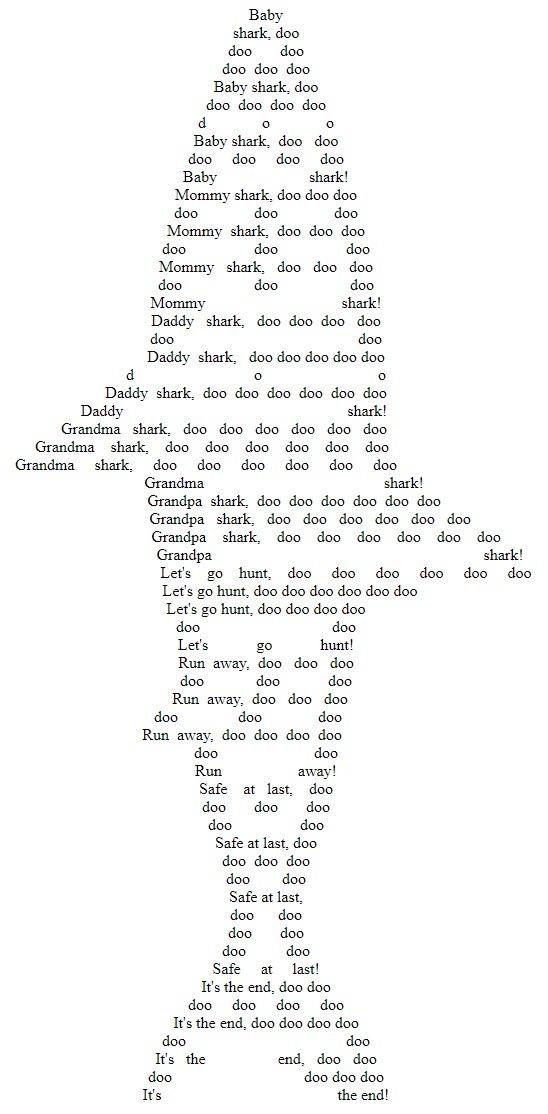
The output creates a recognizable shark silhouette using the song lyrics as the “pixels” of the ASCII art.
Lessons Learned
Technical Insights
- AMPScript Flexibility: Shows the creative potential beyond email personalization
- Performance Considerations: Nested loops can impact processing time
- Code Readability: Sometimes creativity conflicts with maintainability
- HTML/AMPScript Integration: Effective mixing of languages for visual output
Programming Challenge Benefits
- Problem-solving skills: Breaking down complex visual requirements
- Algorithm thinking: Converting visual design to logical steps
- Language mastery: Pushing AMPScript beyond typical use cases
- Creative coding: Blending art with technical implementation
Alternative Approaches
For similar ASCII art projects, consider:
- Pre-calculated templates with variable substitution
- External image-to-text converters with AMPScript integration
- Modular functions for reusable positioning logic
- Dynamic canvas sizing based on content length
Conclusion
While this project may not have practical business applications, it demonstrates the creative potential of AMPScript beyond traditional email marketing use cases. The exercise pushed the boundaries of what’s possible with Marketing Cloud’s scripting language and provided valuable experience with:
- Complex algorithm design
- Visual programming concepts
- Advanced AMPScript techniques
- Creative problem-solving approaches
Sometimes the most valuable coding exercises are the ones that make you smile while teaching advanced programming concepts. This Baby Shark ASCII art challenge certainly delivered both! 🦈
Final thought: Never underestimate the learning value of a seemingly “silly” programming challenge. The techniques used here - nested loops, conditional formatting, and precise positioning - apply to many real-world Marketing Cloud scenarios.